
erex
Description
Use the erex command to extract data from a field when you do not know the regular expression to use. The command automatically extracts field values that are similar to the example values you specify.
The values extracted from the fromfield argument are saved to the field. The search also returns a regular expression that you can then use with the rex command to extract the field.
Syntax
The required syntax is in bold.
- erex
- [<field>]
- examples=<string>
- [counterexamples=<string>]
- [fromfield=<field>]
- [maxtrainers=<integer>]
Required arguments
- examples
- Syntax: examples=<string>,<string>...
- Description: A comma-separated list of example values for the information to extract and save into a new field. Use quotation marks around the list if the list contains spaces. For example:
"port 3351, port 3768".
- field
- Syntax: <string>
- Description: A name for a new field that will take the values extracted from the
fromfieldargument. The resulting regular expression is generated and placed as a message under the Jobs menu in Splunk Web. That regular expression can then be used with therexcommand for more efficient extraction.
Optional arguments
- counterexamples
- Syntax: counterexamples=<string>,<string>,...
- Description: A comma-separated list of example values that represent information not to be extracted.
- fromfield
- Syntax: fromfield=<field>
- Description: The name of the existing field to extract the information from and save into a new field.
- Default:
_raw
- maxtrainers
- Syntax: maxtrainers=<int>
- Description: The maximum number values to learn from. Must be between 1 and 1000.
- Default: 100
Usage
The values specified in the examples and counterexample arguments must exist in the events that are piped into the erex command. If the values do not exist, the command fails.
To make sure that the erex command works against your events, first run the search that returns the events you want without the erex command. Then copy the field values that you want to extract and use those for the example values with the Click the Job menu to see the generated regular expression based on your examples.
After you run a search or open a report in Splunk Web, the erex command returns informational log messages that are displayed in the search jobs manager window. However, these messages aren't displayed if the infocsv_log_level setting is set to WARN or ERROR. If you do not see the informational log messages when you click Jobs from the Activity menu, make sure that infocsv_log_level is set to the default, which is INFO.
- Splunk Cloud Platform
- To change the
infocsv_log_levelsetting, request help from Splunk Support. If you have a support contract, file a new case using the Splunk Support Portal at Support and Services. Otherwise, contact Splunk Customer Support.
- Splunk Enterprise
- To change the the
infocsv_log_levelsetting in the limits.conf file, follow these steps.
- Prerequisites
- Only users with file system access, such as system administrators, can edit configuration files.
- Review the steps in How to edit a configuration file in the Splunk Enterprise Admin Manual.
Never change or copy the configuration files in the default directory. The files in the default directory must remain intact and in their original location. Make changes to the files in the local directory.
- Steps
- Open or create a local limits.conf file at $SPLUNK_HOME/etc/system/local.
- Under the [search_info] stanza, change the value for the
infocsv_log_levelsetting.
View the regular expression
You can see the regular expression that is generated based on the erex command by clicking the Job menu in Splunk Web. See Example 3.
The output of the erex command is captured in the search.log file. You can see the output by searching for "Successfully learned regex". The search.log file is located in the $SPLUNK_HOME/var/run/splunk/dispatch/ directory. The search logs are not indexed by default. See Dispatch directory and search artifacts in the Search Manual.
Examples
1. Extract values based on an example
The following search extracts out month and day values like 7/01 and puts the values into the monthday attribute.
... | erex monthday examples="7/01"
2. Extract values based on examples and counter examples
The following search extracts out month and day values like 7/01 and 7/02, but not patterns like 99/2. The extracted values are put into the monthday attribute.
... | erex monthday examples="7/01, 07/02" counterexamples="99/2"
3. Extract values based on examples and return the most common values
| This example uses the sample data from the Search Tutorial. To try this example on your own Splunk instance, you must download the sample data and follow the instructions to get the tutorial data into Splunk. Use the time range All time when you run the search. |
Determine which are the most common ports used by potential attackers.
- Run a search to find examples of the port values, where there was a failed login attempt.
sourcetype=secure* port "failed password"
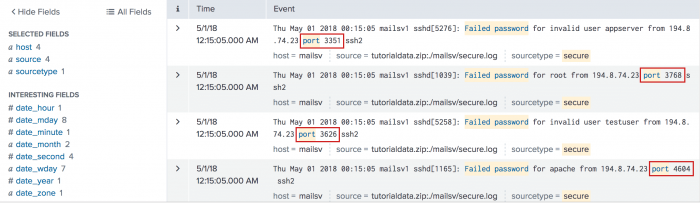
- Then use the
erexcommand to extract the port field. You must specify several examples with theerexcommand. Use thetopcommand to return the most common port values. By default thetopcommand returns the top 10 values.
sourcetype=secure* port "failed password" | erex port examples="port 3351, port 3768" | top port
This search returns a table with the count of top ports that match the search.
The results appear on the Statistics tab and look something like this:port count percent port 2444 20 0.060145 port 3281 19 0.057138 port 2842 19 0.057138 port 2760 19 0.057138 port 1174 19 0.057138 port 4955 18 0.054130 port 1613 18 0.054130 port 1059 18 0.054130 port 4542 17 0.051123 port 4519 17 0.051123 - Click the Job menu to see the generated regular expression based on your examples. You can use the
rexcommand with the regular expression instead of using theerexcommand. The regular expression for this search example is
| rex (?i)^(?:[^\.]*\.){3}\d+\s+(?P<port>\w+\s+\d+)for this search example.
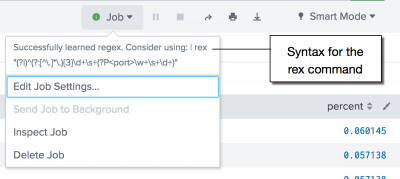
You can replace theerexcommand with therexcommand and generated regular expression in your search. For example:sourcetype=secure* port "failed password" | rex (?i)^(?:[^\.]*\.){3}\d+\s+(?P<port>\w+\s+\d+) | top port
Using the
rexcommand with a regular expression is more cost effective than using theerexcommand.


See also
| entitymerge | eval |
This documentation applies to the following versions of Splunk® Enterprise: 7.1.0, 7.1.1, 7.1.2, 7.1.3, 7.1.4, 7.1.5, 7.1.6, 7.1.7, 7.1.8, 7.1.9, 7.1.10, 7.2.0, 7.2.1, 7.2.2, 7.2.3, 7.2.4, 7.2.5, 7.2.6, 7.2.7, 7.2.8, 7.2.9, 7.2.10, 7.3.0, 7.3.1, 7.3.2, 7.3.3, 7.3.4, 7.3.5, 7.3.6, 7.3.7, 7.3.8, 7.3.9, 8.0.0, 8.0.1, 8.0.2, 8.0.3, 8.0.4, 8.0.5, 8.0.6, 8.0.7, 8.0.8, 8.0.9, 8.0.10, 8.1.0, 8.1.1, 8.1.2, 8.1.3, 8.1.4, 8.1.5, 8.1.6, 8.1.7, 8.1.8, 8.1.9, 8.1.10, 8.1.11, 8.1.12, 8.1.13, 8.1.14, 8.2.0, 8.2.1, 8.2.2, 8.2.3, 8.2.4, 8.2.5, 8.2.6, 8.2.7, 8.2.8, 8.2.9, 8.2.10, 8.2.11, 8.2.12, 9.0.0, 9.0.1, 9.0.2, 9.0.3, 9.0.4, 9.0.5, 9.0.6, 9.0.7, 9.0.8, 9.0.9, 9.0.10, 9.1.0, 9.1.1, 9.1.2, 9.1.3, 9.1.4, 9.1.5, 9.1.6, 9.1.7, 9.2.0, 9.2.1, 9.2.2, 9.2.3, 9.2.4, 9.3.0, 9.3.1, 9.3.2, 9.4.0
 Download manual

Feedback submitted, thanks!